
Introduction
Rapid prototyping CNC machining is one of the most reliable ways to get functional, test-ready metal parts when the design has real mechanical interfaces—precision holes, flatness requirements, datum-controlled features, threads, or sealing surfaces. It’s commonly used as a bridge between early CAD and later tooling or scaled production, because the part behaves like the real alloy and the geometry can be inspected against the drawing.
For OEM teams, “rapid” rarely means only spindle time. The schedule is usually constrained by quoting clarity, material sourcing, finishing queues, and inspection sign-off. That’s why rapid prototype builds tend to succeed or fail based on how well the RFQ package defines tolerances, datums, and what documentation is required.
In this guide, you’ll get practical ranges for tolerances, surface roughness (Ra), and prototype lead-time tiers, plus the cost/schedule drivers that make projects slip. You’ll also get a concrete checklist of QC artifacts—material certs, dimensional reports, and FAI expectations—so procurement and SQE can align approval gates with engineering intent.
You’ll also see how to choose between CNC and metal additive manufacturing (AM), and when a hybrid route (print then machine) reduces risk by reserving precision work for the interfaces that matter.
Table of Contents
Capabilities and specs
Tolerances you can expect

Most prototype CNC programs start from a “standard” tolerance band and then tighten only the features that control function. That approach keeps cycle time, rework risk, and inspection effort aligned with what the part actually needs.
A commonly cited benchmark for general CNC machining is ±0.005 in (±0.13 mm), as summarized in guides such as 3ERP’s machining tolerances overview (2023)
. Many suppliers can hold tighter on specific features, but the practical limit depends on geometry, setup count, measurement method, and how stable the material is during machining.
For tighter needs, some services publish a standard “precision” option around ±0.002 in (±0.051 mm), for example Protolabs’ guidance on ±0.002 in CNC tolerance
. Below that, what’s realistic becomes feature-specific (for example: bores that can be reamed, short critical lengths, or features that can be measured and compensated reliably).
To make tolerance decisions audit-friendly, separate what must be controlled from what can float:
- Interface-critical features: fits, bearing bores, sealing lands, dowel holes, locating faces, and any feature that controls assembly stack-up.
- Process-capability features: surfaces that exist for clearance, weight reduction, or aesthetics.
When you send an RFQ, it helps to translate tolerances into intent. A supplier can often propose a faster process plan when you specify why a feature is tight (e.g., “bearing press fit,” “O-ring sealing face,” “datum for assembly alignment”) rather than leaving them to infer it.
Key Takeaway: Tighten tolerances where they control function. Keep the rest standard, and document acceptance criteria so the inspection plan matches the risk.
Surface finish ranges (Ra)
Surface finish isn’t just cosmetic. It affects friction, sealing, coating adhesion, fatigue initiation, and how measurement behaves on a CMM or profilometer. It also changes cost quickly because it can force slower finishing passes, different tooling, or secondary operations.
For many machined parts, Ra 3.2 µm (125 µin) is often treated as a default “as-machined” reference when a drawing does not specify otherwise, as shown in charts such as Ra 3.2 µm (125 µin) as a common default finish
. In practice, many functional prototypes target Ra 1.6–3.2 µm depending on whether the surface is a mating interface, sliding contact, or a sealing land.
If you need to translate a roughness callout into a manufacturing plan, references like GD&T Basics’ surface finish primer
help align Ra requirements with what different processes tend to produce.
A procurement-friendly way to specify finish is to limit it to the surfaces that matter:
- Call out Ra max on sealing and bearing surfaces.
- Use a general note (or leave as-machined) for non-functional areas.
- If a coating is required, specify masking requirements for critical fits and threads.
Where teams get burned is mixing “cosmetic” and “functional” language. A note like “smooth finish” is not measurable, and it’s hard to defend in an 8D or supplier corrective action when a program is slipping.
If surface finish is acceptance-critical, make it inspectable:
- State Ra max and the measurement location (e.g., “Ra max on this land only”).
- If direction matters (sliding vs sealing), specify lay direction or use a sketch.
- If you can accept post-processing variance (bead blast, hand deburr), call out what is acceptable and what is not.
This is also where first-article alignment pays off. A surface finish callout without measurement location, direction, or functional rationale can create disputes at receiving inspection.
Materials, QA, inspection
For rapid-turn metal prototypes, the core question is often less “can it be machined” and more “can we source the exact grade quickly and certify it.” Lead time and risk change substantially when you need heat-lot traceability, specific temper/condition, or special process certificates.
On the QA side, rapid prototype programs often stall at approval because inspection expectations weren’t defined. If you need documentation, call it out early. In most OEM workflows, the minimum set looks like this:
- Material certification: mill cert / MTR as required by your drawing notes.
- Dimensional evidence: a full dimensional report, or a critical-feature report mapped to balloon numbers.
- FAI expectations: clarify what “FAI” means in your organization (form, sampling, required fields) and whether a FAIR package is expected.
- Measurement method constraints: if specific features require CMM or calibrated thread gages, state it in the RFQ.
A practical rule: inspection scope should match risk. You want enough data to avoid rework loops, but not so much reporting that the paperwork becomes the lead-time driver.
Lead time & cost drivers for rapid prototyping CNC machining
Lead time tiers (1–14 days)
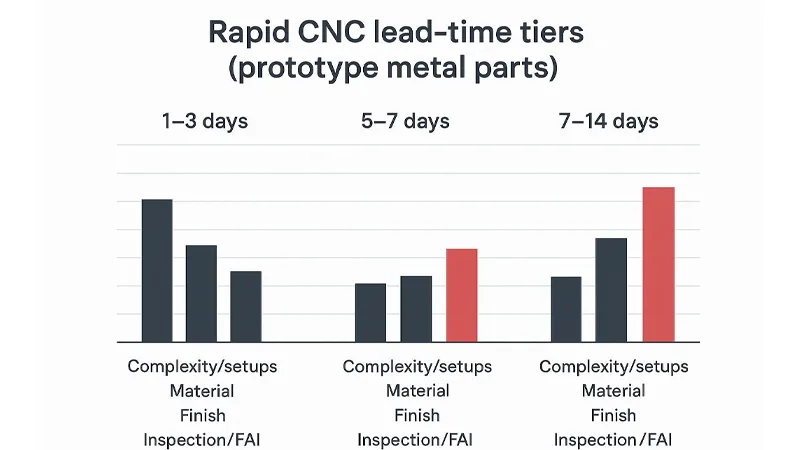
Rapid prototyping CNC machining is usually managed in time “bands.” The exact cutoffs vary by supplier, but a realistic model looks like this:
- 1–3 days (expedite): simple geometries, stable material availability, minimal finishing, and a tightly defined inspection scope.
- 5–7 days (standard): moderate complexity, common materials, standard finish, normal queueing.
- 7–14 days (complex/controlled): multi-setup parts, harder-to-machine alloys, cosmetic finish requirements, and expanded inspection/FAI documentation.
For reference, Protolabs’ CNC lead time options
show standard and expedited tiers, and Fictiv’s 2026 prototyping lead time breakdown
highlights that non-machine time (iteration, sourcing, coordination) often dominates schedules.
The decision-stage takeaway is that lead time is rarely a single number. It’s a function of what you asked for, what you didn’t specify, and what the supplier must prove before shipment.
Top cost drivers to control
If you want predictable cost on rapid prototypes, treat these as the primary control knobs:
- Setup count / re-orientation: every extra setup increases programming, fixturing, risk of datum drift, and inspection burden.
- Tolerance density: tight tolerances on non-functional features increase cycle time and inspection time without improving performance.
- Surface finish and cosmetic requirements: can push you into slower finishing passes or secondary finishing.
- Material selection and cert requirements: niche alloys and traceability requirements can become the schedule bottleneck.
- Post-processing scope: heat treat, coating, deburr standards, and cleaning requirements often have their own queues.
A practical procurement pattern is to ask the supplier to break the quote into three buckets: (1) machining, (2) post-processing, (3) inspection/reporting. That makes it obvious where “expedite” is actually possible and where the schedule is constrained by an external step.
Pro Tip: If schedule is critical, do a two-step build: first iteration for geometry/fit with relaxed cosmetics, then a second iteration that adds finish and documentation for stakeholder sign-off.
QA docs and schedule impact
QC paperwork creates real work and real lead-time.
- Material cert collection and verification can be quick for common alloys, but slower when heat-lot traceability is required or when multiple sub-suppliers are involved.
- Dimensional reports expand inspection scope. A full ballooned report generally takes longer than a critical-feature report.
- FAI expectations can add iteration time when drawing notes are ambiguous (datum scheme, measurement method, sampling rule, revision control).
If you also need a coating, treat it as a schedule line item, not an afterthought. For example, AFI’s finishing page lists AFI Parts powder coating lead time (3–5 business days)
for standard colors—use that as a planning baseline when coating is mandatory.
DFM for rapid CNC
Geometry: walls, holes, radii
DFM for speed is mostly about avoiding features that force special tooling, chatter risk, or multiple setups. The goal is not to “dumb down” the part—it’s to remove geometry that creates schedule risk without adding functional value.
Walls: thin walls can be machined, but they tend to deflect, vibrate, and move after roughing. If you need thin sections, flag them as function-critical and allow the supplier to plan a stable sequence (rough, stress relief if needed, finish) and to propose temporary supports if appropriate.
Holes: deep, small-diameter holes drive cycle time and tool-break risk. If depth is negotiable, reduce it. If tolerance is negotiable, relax it. If the feature is critical, specify the functional requirement (press fit, clearance, dowel) and let the supplier propose the right finishing method.
Radii: sharp internal corners force small tools and slow feeds. Adding internal radii is one of the most reliable ways to reduce machining time without changing assembly function.
Tolerances: where to tighten
A rapid prototype drawing usually benefits from two tolerance layers:
- Critical features: interfaces that control assembly, sealing, alignment, and rotating elements.
- Everything else: standard tolerances that keep cost and inspection time controlled.
If you tighten everything “just in case,” you pay twice: once in machining time, and again in inspection effort. A better pattern is to mark critical features clearly and to state what makes them critical (fit class, allowable leak, torque transmission, alignment).
If your organization uses a general tolerance standard (for example, an ISO 2768 scheme), include it in the drawing notes. It reduces interpretation risk and speeds quoting.
Inspection plan and datums
If you want fast approvals, define the inspection plan as part of the RFQ—before chips are cut.
A practical inspection plan typically includes:
- a primary datum scheme (A/B/C) that matches how the part is fixtured and assembled
- which features must be verified on a CMM vs. allowable manual methods
- reporting format expectations (ballooned drawing, FAIR/FAI form, critical-feature table)
- acceptance criteria for surface finish where relevant (Ra max and measurement location)
This is also where supplier support matters. For example, teams working with AFI Industrial Co., Ltd. (AFI Parts)
often run an early drawing review to align datums, critical-to-quality features, and inspection scope before cutting chips. The value isn’t promotional—it’s eliminating ambiguity that creates rework loops in a rapid-turn build.
Key Takeaway: If you want a fast, low-drama build, treat DFM + inspection planning as one activity. Datums, tolerance intent, and reporting format should be aligned before the first setup is programmed.
CNC vs metal 3D printing
When to choose CNC
Choose CNC when the prototype must behave like a production metal part and you need predictable verification and assembly fit:
- feature-specific tolerances that require controlled datums
- machined mating interfaces, sealing surfaces, bearing fits
- threads that need repeatable engagement
- when you need a dimensional report that maps cleanly to drawing callouts
If you’re sourcing CNC prototypes, it helps to align the process to the geometry early—milled prismatic parts vs. turned rotational parts. For internal references, AFI’s overviews of AFI Parts CNC milling
and AFI Parts CNC turning
show how suppliers typically frame capability, materials, finishing options, and inspection expectations.
When to choose metal AM
Metal AM can be the faster path when geometry—not tolerance—is the primary constraint.
Choose metal AM when:
- internal channels, lattice structures, or topology-optimized shapes are required
- you’re validating thermal flow, weight reduction, or complex internal routing
- you can accept post-processing (support removal, heat treatment, machining on critical interfaces)
Surface finish is a common decision driver. Protolabs notes that DMLS as-built roughness can be on the order of 200–400 µin Ra, and post-process machining is commonly used to improve functional surfaces—see Protolabs’ post-processing guidance for metal 3D printing
.
Hybrid: print then machine
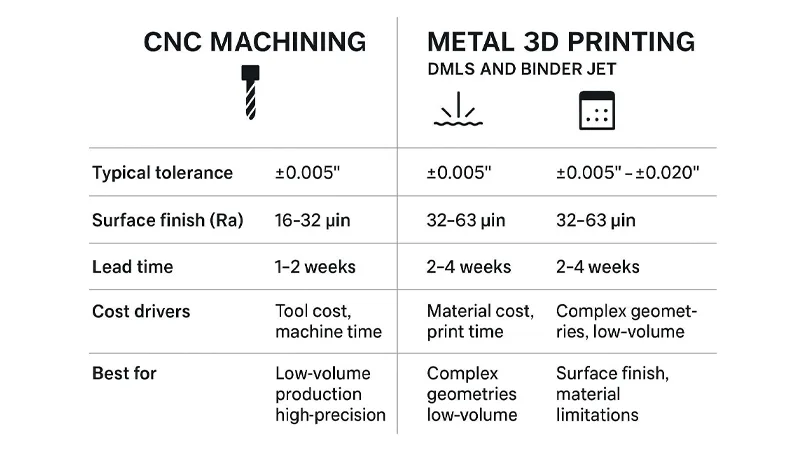
Hybrid is often the lowest-risk option for complex prototypes: print the near-net shape to reduce setup complexity, then machine the critical datums and interfaces.
Hybrid can reduce schedule risk when:
- printing removes multi-setup machining from non-critical geometry
- tight tolerances are required only on a subset of features
- the inspection plan is built around machined datums (so verification is repeatable)
In decision-stage programs, hybrid is often less about cost and more about controlling failure modes: you accept the variability of printed surfaces where it doesn’t matter and reserve CNC for the surfaces that must pass assembly and inspection.
Conclusion
Speed in rapid prototyping CNC machining is mostly a planning problem: define what must be precise, what can be standard, and what documentation is required for approval. When you do that up front, you reduce the two biggest schedule killers—iteration loops and inspection ambiguity.
Key takeaways:
- Use realistic tolerance bands (standard vs. critical features) and tie tight callouts to functional intent.
- Specify surface finish (Ra) only where it changes performance, and treat coatings as explicit schedule adders.
- Build lead time around tiers (1–3, 5–7, 7–14 days) and identify the dominant driver early (setups, material, finish, inspection).
- Choose CNC vs metal AM based on what you’re validating: interfaces and verification (CNC) vs geometry and internal complexity (AM), with hybrid as a common bridge.
One last decision-stage reminder: if you want a supplier to commit to a short lead time, you need to give them something they can commit against. That usually means a controlled drawing revision, a clear critical-feature list, and a defined inspection deliverable. When those inputs are missing, suppliers protect themselves with longer lead times (or they ship fast and hope your receiving inspection doesn’t bounce the part).
Next steps that reduce schedule risk on your next RFQ:
- Send a clean drawing pack (rev controlled) plus a short “critical features” note.
- Request a DFM review that confirms datums, workholding approach, and where tolerances can be relaxed.
- Align on the inspection plan (report format + critical features) before production starts.
- Ask the supplier to call out schedule drivers explicitly (material lead, finishing queue, inspection scope) so procurement can plan buffers.
FAQ
Rapid prototyping in CNC machining means making a small quantity of functional, test-ready parts quickly from production-like materials (e.g., aluminum, steel, titanium) so you can verify fit, function, and manufacturability before scaling.
Typical lead times fall into tiers: 1–3 days for simple, expedited parts; 5–7 days for standard complexity; and 7–14 days when parts require multiple setups, harder materials, special finishes, or expanded inspection/FAI documentation.
A common baseline is around ±0.005 in (±0.13 mm) for general machining, with tighter tolerances (for example ±0.002 in / ±0.051 mm) often achievable on specific critical features when the geometry and measurement method support it.
Choose CNC when you need predictable tolerances, reliable datums, true-to-material behavior, and inspectable interfaces (threads, bearing fits, sealing surfaces). Choose metal 3D printing when geometry (internal channels, lattices) matters more than surface finish and tight tolerances—often with machining added on critical interfaces.